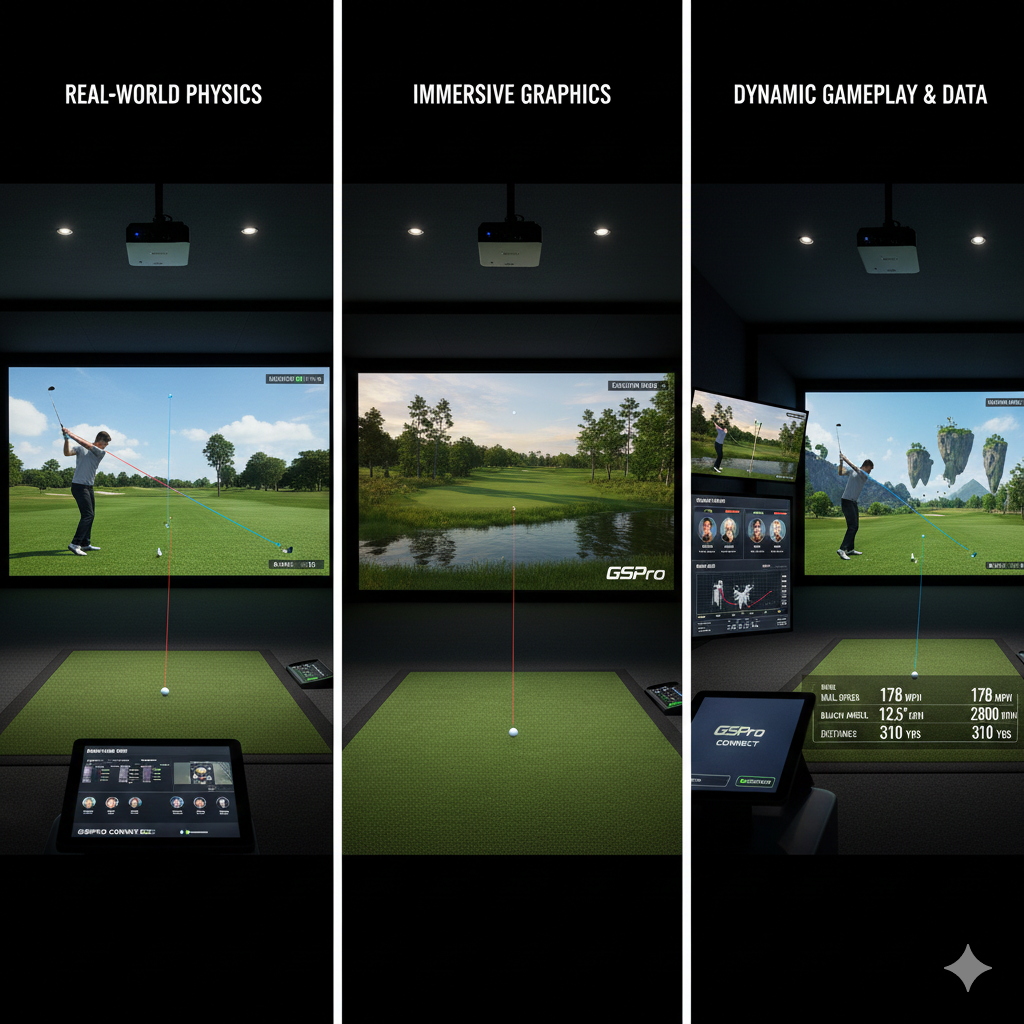

Swing analysis applications provide immediate feedback during practice sessions, enabling golfers to make real-time adjustments to their technique. This instant feedback mechanism helps identify technical flaws that may not be apparent without technological assistance. Through systematic analysis of swing data, golfers can target specific areas requiring improvement, resulting in more focused practice sessions and enhanced performance outcomes.
Modern swing analysis applications incorporate advanced metrics and visualization tools that provide detailed insights into swing mechanics. These systems analyze movements frame by frame, measuring key parameters including swing path, club speed, and angle of attack. Access to this quantitative data allows golfers to develop a comprehensive understanding of their technical strengths and areas needing development.
This data-driven approach enables the establishment of specific improvement goals, creating more structured and efficient practice routines.
Key Takeaways
- Integrating swing analysis apps enhances home studio training by providing detailed performance insights.
- Selecting the right app depends on compatibility, features, and your specific training goals.
- Connecting apps with your existing tech stack enables seamless data flow and comprehensive analysis.
- Utilizing video capture and real-time feedback features improves technique and accelerates skill development.
- Leveraging cloud storage and integration with VR tools expands training possibilities and data accessibility.
Choosing the Right Swing Analysis App for Your Home Studio
When it comes to selecting the ideal swing analysis app for our home studio, we must consider several factors to ensure it meets our specific needs. First and foremost, we should evaluate the app’s compatibility with our existing equipment. Some apps are designed to work seamlessly with certain cameras or sensors, while others may require additional hardware.
By understanding our current setup, we can narrow down our options and choose an app that integrates smoothly into our home studio environment. Additionally, we should explore the features offered by various swing analysis apps. Some may focus primarily on video capture and playback, while others provide in-depth analytics and performance tracking.
We should look for apps that offer customizable settings, allowing us to tailor the experience to our unique swing style. User reviews and expert recommendations can also guide us in making an informed decision. Ultimately, the right app will not only enhance our practice sessions but also align with our long-term goals as golfers.
Connecting Your Swing Analysis App to Your Home Studio Tech Stack
Once we have chosen the right swing analysis app, the next step is to connect it to our home studio tech stack. This process typically involves linking the app to our camera or sensor system, ensuring that it can capture our swings accurately. Depending on the app and equipment we are using, this may require some technical know-how.
However, most modern apps come with user-friendly interfaces and step-by-step instructions that simplify the setup process. In addition to connecting our camera or sensor, we should also consider how the app integrates with other devices in our tech stack. For instance, if we use a tablet or smartphone for analysis, we can sync these devices to access data on the go.
This connectivity allows us to review our swings immediately after practice or even during a round of golf. By creating a cohesive tech ecosystem within our home studio, we can maximize the benefits of swing analysis and enhance our overall training experience.
Utilizing Video Capture and Analysis Features in Your Home Studio
The video capture capabilities of swing analysis apps are among their most powerful features. By recording our swings from multiple angles, we gain a comprehensive view of our technique. This visual feedback is crucial for identifying inconsistencies and areas for improvement.
We can analyze our posture, grip, and follow-through in ways that are simply not possible through self-assessment alone. The ability to replay these videos allows us to compare our current swings with past performances, providing a clear picture of our progress over time. Furthermore, many swing analysis apps offer advanced editing tools that enable us to annotate videos with notes or markers.
This feature allows us to highlight specific aspects of our swing that require attention or to remind ourselves of key coaching points. By actively engaging with the video content, we reinforce our learning and create a more interactive practice environment. The combination of video capture and analysis transforms our home studio into a dynamic space for growth and development.
Incorporating Swing Metrics and Data into Your Home Studio Setup
| Metric | Description | Typical Value | Impact on Home Studio Integration |
|---|---|---|---|
| Data Latency | Time delay between swing capture and data availability | 100-300 ms | Lower latency improves real-time feedback and coaching |
| Compatibility | Supported operating systems and devices | Windows, macOS, iOS, Android | Broader compatibility allows seamless integration with existing tech |
| Data Export Formats | File types available for exporting swing data | CSV, JSON, XML, Video (MP4) | Flexible formats enable easier data analysis and sharing |
| Sensor Accuracy | Precision of swing metrics (e.g., club speed, angle) | ±1-3% | Higher accuracy leads to better training outcomes |
| Integration APIs | Availability of APIs for connecting with other software | RESTful APIs, Webhooks | APIs facilitate automation and custom workflows |
| Storage Requirements | Disk space needed for app and data storage | 500 MB – 5 GB | Impacts hardware selection and data management strategies |
| Real-Time Analysis | Capability to analyze swings instantly | Yes/No | Essential for immediate feedback during practice sessions |
Incorporating swing metrics into our home studio setup is essential for tracking progress and refining our technique. Most swing analysis apps provide a wealth of data points, including club speed, launch angle, and swing path. By regularly reviewing these metrics, we can identify trends in our performance and make informed decisions about our training focus.
For instance, if we notice a consistent drop in club speed, we might prioritize strength training or flexibility exercises to address this issue. Moreover, visualizing this data through graphs or charts can enhance our understanding of how different factors influence our swings. Many apps allow us to compare our metrics against benchmarks or averages for players at similar skill levels.
This comparative analysis not only motivates us but also provides context for our performance improvements. By integrating swing metrics into our home studio routine, we create a data-driven approach to practice that fosters accountability and encourages continuous growth.
Integrating Swing Analysis App Data with Other Fitness and Performance Tracking Tools

To maximize the benefits of swing analysis apps, we should consider integrating their data with other fitness and performance tracking tools in our home studio. For example, if we use a fitness tracker or smartwatch to monitor our physical activity, syncing this data with our swing metrics can provide valuable insights into how physical conditioning impacts our performance on the course. By correlating swing data with fitness levels, we can identify areas where improvements in strength or endurance may lead to better results.
Additionally, many golfers benefit from using apps that track their nutrition and recovery routines. By combining this information with swing analysis data, we can develop a holistic approach to training that encompasses all aspects of performance. For instance, if we notice that certain dietary choices correlate with improved swing metrics, we can adjust our nutrition plan accordingly.
This integration of data creates a comprehensive picture of our training regimen and helps us make informed decisions about how to optimize our performance.
Utilizing Real-Time Feedback and Coaching Features in Your Home Studio
One of the standout features of many swing analysis apps is their ability to provide real-time feedback during practice sessions. This functionality allows us to receive immediate insights as we work on specific aspects of our swings. For instance, if we’re focusing on improving our follow-through, the app can alert us when we’re deviating from the desired technique.
This instant feedback is invaluable; it enables us to make adjustments on the spot rather than waiting until after practice to analyze our performance. Furthermore, some apps offer virtual coaching features that connect us with professional instructors or experienced players who can provide personalized guidance based on our recorded swings. This level of interaction enhances the learning experience by allowing us to receive tailored advice that addresses our unique challenges.
By incorporating real-time feedback and coaching into our home studio setup, we create an environment conducive to rapid improvement and skill development.
Customizing Your Home Studio Tech Stack for Seamless Integration with Swing Analysis Apps
To fully leverage the capabilities of swing analysis apps, customizing our home studio tech stack is essential. This customization involves selecting equipment that not only meets our needs but also integrates seamlessly with the app we’ve chosen. For instance, investing in high-quality cameras or sensors that are compatible with the app can significantly enhance the accuracy of swing data capture.
Additionally, ensuring that all devices are connected through a reliable network will minimize disruptions during practice sessions. We should also consider how software updates and new features from the app may impact our tech stack over time. Staying informed about advancements in swing analysis technology allows us to adapt and upgrade components as needed.
By proactively customizing our home studio setup, we create a flexible environment that evolves alongside our training needs and maximizes the benefits of integrating swing analysis apps.
Leveraging Cloud-Based Storage and Sharing for Swing Analysis Data
In today’s digital age, leveraging cloud-based storage solutions for swing analysis data is a game-changer for golfers looking to track their progress over time. By storing videos and metrics in the cloud, we ensure that all of our data is easily accessible from any device with an internet connection. This convenience allows us to review past performances whenever needed, whether at home or on the go.
Additionally, cloud storage provides a secure backup for all of our valuable data, protecting it from potential loss due to hardware failures. Moreover, many swing analysis apps offer sharing features that enable us to collaborate with coaches or fellow golfers easily. By sharing videos and metrics through cloud platforms, we can receive feedback from trusted sources who can help us refine our technique further.
This collaborative approach fosters a sense of community within the golfing world and encourages us to learn from one another’s experiences.
Integrating Swing Analysis Apps with Virtual Reality and Simulation Tools in Your Home Studio
The integration of swing analysis apps with virtual reality (VR) and simulation tools represents an exciting frontier in golf training within home studios. By combining these technologies, we can create immersive practice environments that replicate real-world golfing scenarios. For instance, VR simulations allow us to experience different courses and conditions while receiving real-time feedback on our swings through the analysis app.
This combination enhances both skill development and mental preparation for actual rounds of golf. Additionally, using VR technology alongside swing analysis tools enables us to visualize improvements in technique more effectively. As we work on specific aspects of our swings within a simulated environment, we can immediately see how adjustments impact performance metrics captured by the app.
This interactive experience not only makes practice more engaging but also reinforces learning by providing immediate visual feedback on changes made during training sessions.
Maximizing the Potential of Integrating Swing Analysis Apps with Your Home Studio Tech Stack
To truly maximize the potential of integrating swing analysis apps into our home studio tech stack, we must adopt a holistic approach to training that encompasses all aspects of performance improvement. This means regularly reviewing data collected from swings while also considering physical conditioning, mental preparation, and course management strategies. By taking a comprehensive view of our development as golfers, we can identify synergies between different training modalities that enhance overall performance.
Furthermore, staying committed to continuous learning is essential as technology evolves within the golfing landscape. Engaging with online communities or attending workshops focused on swing analysis can provide valuable insights into best practices for utilizing these tools effectively. By remaining open-minded and adaptable in how we integrate technology into our training routines, we position ourselves for sustained growth as golfers while fully harnessing the benefits offered by swing analysis apps in conjunction with other elements of our home studio setup.
In conclusion, integrating swing analysis apps into our home studio offers numerous benefits that can significantly enhance our golfing experience. From immediate feedback on technique to comprehensive data tracking and collaboration opportunities with coaches or peers—these tools empower us as players seeking improvement at every level of play. By thoughtfully selecting compatible equipment while customizing setups tailored specifically toward individual needs; leveraging cloud storage solutions; exploring innovative technologies like VR—there’s no limit to what we can achieve when maximizing this integration within personal training environments!
Integrating Swing Analysis Apps with Your Home Studio Tech Stack can significantly enhance your practice sessions, but it’s also essential to consider the overall environment of your studio. For insights on creating the perfect atmosphere, you might find the article on choosing the perfect lighting and sound system for your home golf studio particularly useful. This resource provides valuable tips on how to optimize your studio setup for an immersive training experience.
FAQs
What is swing analysis in the context of a home studio?
Swing analysis refers to the process of evaluating and improving the mechanics of a golf swing using digital tools and software. In a home studio, this typically involves using cameras, sensors, and specialized apps to capture and analyze swing data for performance enhancement.
What types of technology are commonly used in swing analysis apps?
Swing analysis apps often utilize high-speed cameras, motion sensors, launch monitors, and sometimes wearable devices. These technologies capture detailed data such as swing speed, angle, tempo, and ball trajectory, which the app then processes to provide feedback.
How can swing analysis apps be integrated into a home studio setup?
Integration usually involves connecting the swing analysis app with existing hardware like cameras or sensors in the home studio. This can be done via USB, Bluetooth, or Wi-Fi, allowing real-time data capture and analysis. Additionally, apps can be linked with other software for video editing or performance tracking.
Are there compatibility considerations when integrating swing analysis apps with home studio equipment?
Yes, compatibility depends on the operating system (Windows, macOS, iOS, Android), hardware interfaces (USB, Bluetooth), and software requirements. It is important to verify that the swing analysis app supports the devices and platforms used in your home studio.
Can swing analysis apps work with other fitness or training software?
Many swing analysis apps offer integration or data export features that allow them to work alongside other fitness or training software. This enables users to combine swing data with broader training metrics for a comprehensive performance overview.
What are the benefits of integrating swing analysis apps into a home studio tech stack?
Integrating these apps provides immediate feedback, detailed performance metrics, and the ability to track progress over time. It enhances training efficiency, helps identify technical flaws, and supports data-driven improvement without needing to visit a professional facility.
Do swing analysis apps require a high level of technical expertise to use?
Most modern swing analysis apps are designed to be user-friendly with intuitive interfaces. While some technical knowledge can help optimize setup and integration, many apps provide tutorials and customer support to assist users of all skill levels.
Is it necessary to have specialized hardware to use swing analysis apps in a home studio?
While some apps can function with just a smartphone camera, specialized hardware like high-speed cameras, launch monitors, or sensors can significantly improve data accuracy and analysis quality. The choice depends on the user’s goals and budget.
How secure is the data collected by swing analysis apps?
Data security varies by app and developer. Reputable apps follow industry standards for data encryption and privacy. Users should review privacy policies and ensure that their data is stored and transmitted securely, especially when using cloud-based services.
Can swing analysis apps be used for sports other than golf?
Some swing analysis apps are designed specifically for golf, while others may support similar swing-based sports like baseball or tennis. It is important to check the app’s specifications to confirm its suitability for different sports.